I have done all that. Except for obtaining a logs I have two of my device showing up in the devices. I don’t understand why there are so many additional presenceSensor capabilities attached to the one device. As you can aee in the screenshot the 3 presenceSensor have the same status but the main doesn’t match. Sometimes every presenceSensor status will have different timestamps
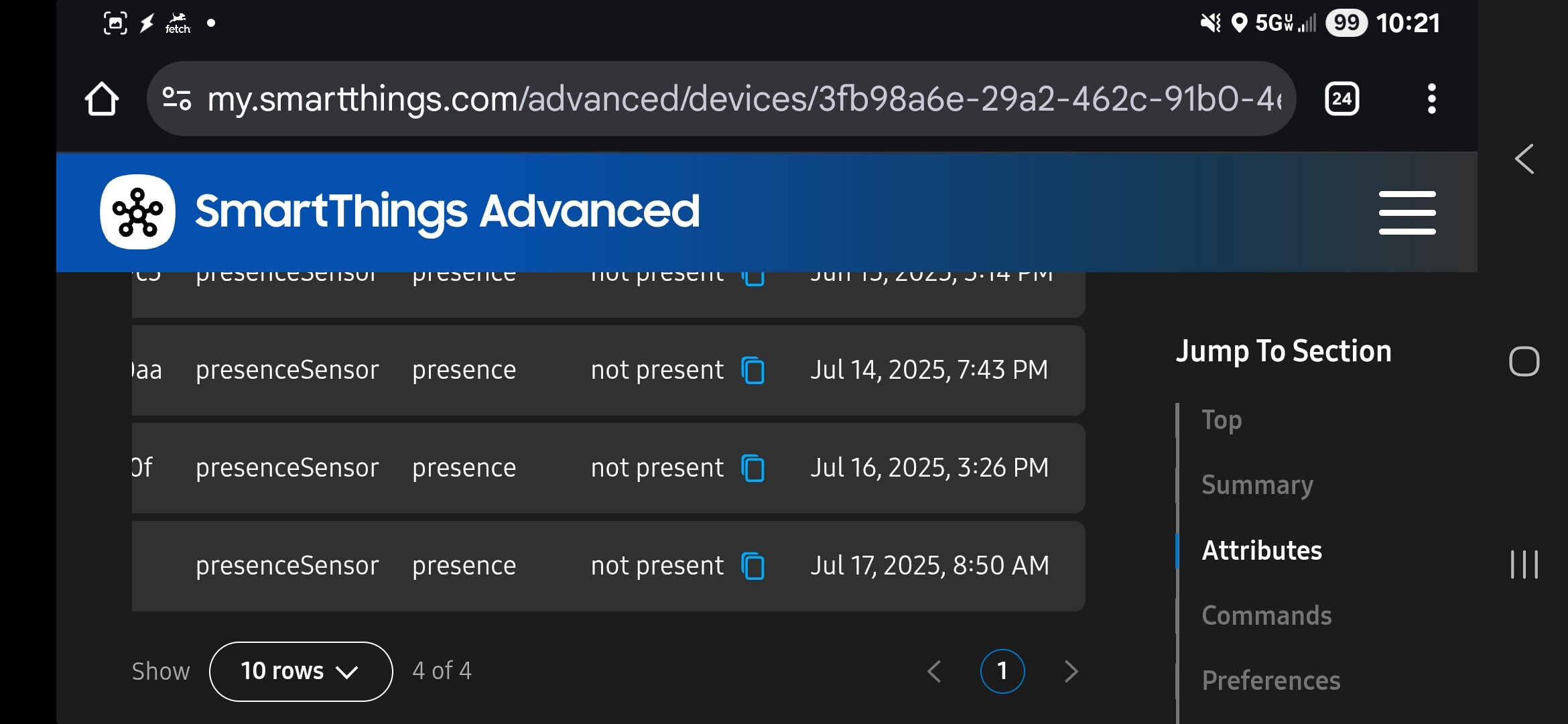



There should be a minimum of two devices for each mobile device.
One represents the mobile device itself. It is only visible to the user that owns it and it exists outside of any Location. This device has a child device in each SmartThings Location where the app has been enabled for location/presence sensing and these are the mobile presence devices.
I am not sure if the parent device exists if the mobile device isn’t enabled for location/presence sensing at all.
The mobile presence devices are visible to all Location members but are hidden from the mobile apps. They have up to four components. The main component contains the ‘home’ presence sensor for your Location. The other up to three components have a UUID as the name and they contain the presence sensor for any ‘linked places’ you have defined for your Location. The label gives your friendly name for the place.
You can read the ‘linked places’ from the Client API if interested (no, I’ve no idea why something so useful isn’t in the public API either).
https://client.smartthings.com/geoplaces?ownerType=LOCATION&ownerId={{locationId}}
As always @orangebucket to the rescue.
What I have noticed is that if I turn off get my location for this device in the app. It removes both devices.
Thanks for the clarification. It’s important that we receive the app logs so the engineering team can investigate the issue properly. Without the logs, it’s difficult to determine what’s causing the discrepancy with the presenceSensor statuses. Please collect and share the logs along with the timestamp when the issue occurs.
Just to be clear you are wanting a ADB logcat, corect?

Hi @Alexhp11 @Jake_Mohl
Here are the steps to generate the app logs
Mobile logs Android
- Go to Menu > Gear Icon > About SmartThings
- Tap the SmartThings logo 10 times.
- This will open the developer’s space > tap ‘report a problem’
- This will send you to the report page. Select a frequency and write a short description of the issue.
- Click on “Report” and a log file will be generated for you to send over email, please do to build@smartthings.com
Mobile logs iOS
First:
- Enable the creation of additional logs in the app:
- In the ST app, go to “menu” > “settings”.
- At the bottom of that page, you’ll find a section called “Troubleshooting”. Please, enable the option that says “Create Additional SmartThings Log”.
- Restart the app
Then:
- In the app menu, go to “contact us”
- Then, tap on “Error reports”
- On the opened page, tap 10 times on the title/label “What is the error about?” or until the prompt to create a log appears.
- Click on “ok” and wait for the process to finish. Then, save the generated file in the place you prefer and share it with us at build@smartthings.com
Thanks for this easter egg! . Log sent!
Just to confirm, did you follow the steps again to re-enable presence detection? If you sent the logs without repeating the process, they no longer exist.
yes i did turn presence on and off just before and after doing the logs
Hi, did we have any progress on this? Still not working..
Hi @Alexhp11, thanks again for sharing these details.
We’ve created ticket for your issue, and our team will be reviewing it. We’ll keep you updated with any developments.
Thanks for your patience!
ok many thanks for the effort on this one, it really has me stumped.

Interesting. Is Family Care a Samsung exclusive? Not seeing it as an option on my Pixel devices.
FWIW, I have had very spotty luck with using the SmartThings built-in presence sensing. It would work well for months then just fail.
A year or so ago I set up Virtual Presence Sensors from @TAustin. They show up as both a switch and a presence sensor. I use the Alexa app on my phone to switch them on and off.
After resolving all the usual location permissions stuff this has been very reliable. One thing that I think is unique to Alexa presence sensing is the ability to set up multiple routines, each with a different radius.
i’m not sure where it came from, it just showed up in the smartthings app a couple of months ago. seems there are a lot of things going on behind the scenes. probably explains the reason some things are breaking every now and then.
I’ve just noticed something new on my Galaxy phone: there’s a “Modes” option in the notification shade and widget menu. Turns out this is part of Samsung’s Modes & Routines, and it looks like it can actually integrate directly with SmartThings, including triggering actions based on location.
I’m going to experiment with this as an alternative way to automate presence-based routines (like switching to “Home” or “Away” mode) since my mobile presence device in SmartThings seems to be read-only and doesn’t accept manual presence commands via the CLI.
If anyone else is hitting the same wall with geolocation or CLI-triggered presence, it might be worth checking out Samsung Modes & Routines — especially if you’re on a Galaxy device.
Will report back if this workaround plays nicely with automations!
This is still ongoing and seems support gave up on me also, maybe they went on summer vacation ? not sure if that’s a thing but its dammed annoying this cant be fixed.
sorry to bug you, is there any kind of progress on this ?