Hi SteveV,
Do you mind to share the design of the gear box with the switch? and what switch are you using?
Thank you!
Hi SteveV,
Do you mind to share the design of the gear box with the switch? and what switch are you using?
Thank you!
Good Morning
I like to get 3/4 gear and motor for my windows. how can I buy/get them? any suggestion? Please
Im stuck with setting up the Windows 7 drivers to detect my WeMos D1 . I have soldered both sets of headers carefully to the board. Then I have plugged the Micro USB port of the WeMos D1 into a standard Micro USB cable and then the other end of the cable into my PC’s USB port. Im running Windows 7. When I plug the board in there is a brief flashing of the Blue LED light on the rear of the board near the
WiFi shield ,but then it just turns off. Windows 7 does not detect new hardware being installed and prompt for a software driver. I go into Device Manager and choose >Scan for new hardware changes and there are no new devices detected. Then I just figured I would install the software driver for Windows 7 64 Bit found here > https://www.silabs.com/products/development-tools/software/usb-to-uart-bridge-vcp-drivers. Drivers reported that they were installed properly.
Do I need to power the board using 5 volts on the VCC Pin and Ground as well as connecting to the Micro USB port on the board? I thought that the power to the board that would be needed would be supplied by just the Micro USB connector.
Did I get a bad board?
Finally figured it out. I tried 2 different Micro USB cables and the board was not recognized by Windows 7. Did some more research and found that some Micro USB cables have all the connections present , but the data portion of the cables is not enabled. So I just continued to try Micro USB Cables and boom! One worked and the Wemos D1 Board was recognized.
Another thing to note was that there was not a Section under Device Manager that listed Ports before the board was recognized. It added it as I imagine this is a legacy device that requires a Port.
IS there a way to alter the sketch and /or the DTH to change closed to open and open to closed?
It will actually be listed under COM devices. The wemos D1 should come up as COM8.
If you are seeing that it is reversed for a contact sensor (or similar) then swap the trigger state in the constructor. So, if you have this:
static st::IS_Contact sensor4(F("contact2"), PIN_CONTACT_2, LOW, true, 1000);
You would change it to this:
static st::IS_Contact sensor4(F("contact2"), PIN_CONTACT_2, HIGH, true, 1000);
The HIGH or LOW in this case is the “trigger” state.
Ryan. Thanks very much for the reply! I am using the original Device Type Handler and Arduino Sketch that @Jetpuff released and not the ST_Anything code.
I scoured the Device Type Handler for any reference to static st and I have not found any instances. I am assuming you are referring to ST_Anything.
What I experience is when I press the close button within the Smarthings Smart App it opens the blinds and vice-versa.
I have been looking to buy something that will work for my blinds/curtains for a while. @Ryan780, How are you fixed for creating this as something I can buy?
Our patio is 9.5m across and being Mexico, it gets ridiculously hot in there. The curtains help, but now that I have everything “smart” manually drawing the curtains is soooooooo 1985.
Will this work to close/open 10m of curtain that are 3.5m tall? I’m happy having a small Arduino box somewhere near the top of the curtains if that’s what it needs. I’ve done some basic Arduino sketches, but I do mean basic. Whilst I like to think I am an electrical whiz, my wife prohibits me from doing anything that might actually kill the kids/her/me (generally in that order), so if I can pay you for your expertise that would be fantastic.
Tim
This project is geared towards control of blinds that are slatted. Typically the 2 inch style. It uses a servo motor to control *only * the tilt of the blinds. Either open , closed , or some position in between.
To pull curtains this is not well suited.If you wanted to adjust the position of the blinds then its a better fit. Also, this project will not pull the pull cord to raise the entire set of blinds upwards. There is too much weight / resistance for that to be accomplished.
Just having completed my first set of blinds with this setup I can tell you from experience that one needs to custom tailor it to thier exact setup. This requires lots of tweaking to make it work just right.
For instance - I have Levelor 2" slatted wood blinds and I needed to make changes to the 3 D model file (.stl format) for it to slide into the header of the blinds properly. I also needed to print another style gear so that it would slide over the internal blinds rod properly (as levelor uses a notched rod that is proprietary)
My point is you can take the most exacting measurements possible and send them to someone to develop a solution , but be prepared for a lot of back and forth trying new designs. Constant modifications to get it well dialed in.
Ive spent hours and hours.
I have got my blinds setup pretty much the way that I want them with some caveats.
If I choose to close the blinds all the way the servo does close them all the way and snugs them up, but then when there is no longer power being sent to the servo it allows reverse rotation to a small degree and the blinds dont have that “clamped tight” seal. Some light is allowed in.
As others have noted when using Alexa to voice control the opening or closing of the blinds one cannot specify a percentage of closed as the Alexa app sends a command that has a trailing decimal point and a zero. Like this 48 becomes 48.0 Since the Device Type Handler and the Arduino Sketch cannot interpret 48.0 as 48 then the blinds fail to adjust to that level.
Hoping someone will code for this so partial open or closed is able to be achieved using voice commands.
Cannot figure out how to change the Open button to Close and Close to Open. This would allow me to close the blinds in the upward fully rotated position rather than the downward fully rotated position.
HI,
im trying to implement these proyect, but i’m having troubles with th ST App, the NodeMCU and web server works well but the ST app doesnt do anything. I have created and configured a new device as the imeges below
I used the codes from this link https://github.com/jetpuf/SmartBlinds
any missing step??
thanks!
Ok. When you open up the administrative panel on your WiFi Router and look at the devices that are connected. Do you see the device listed ? What is the IP address that the router provided it? Did you setup a static IP address by uncommenting the appropriate lines within the code within the sketch? That would be the .ino file that you flashed your NodeMCU device with using the Ardunio Programming tool.
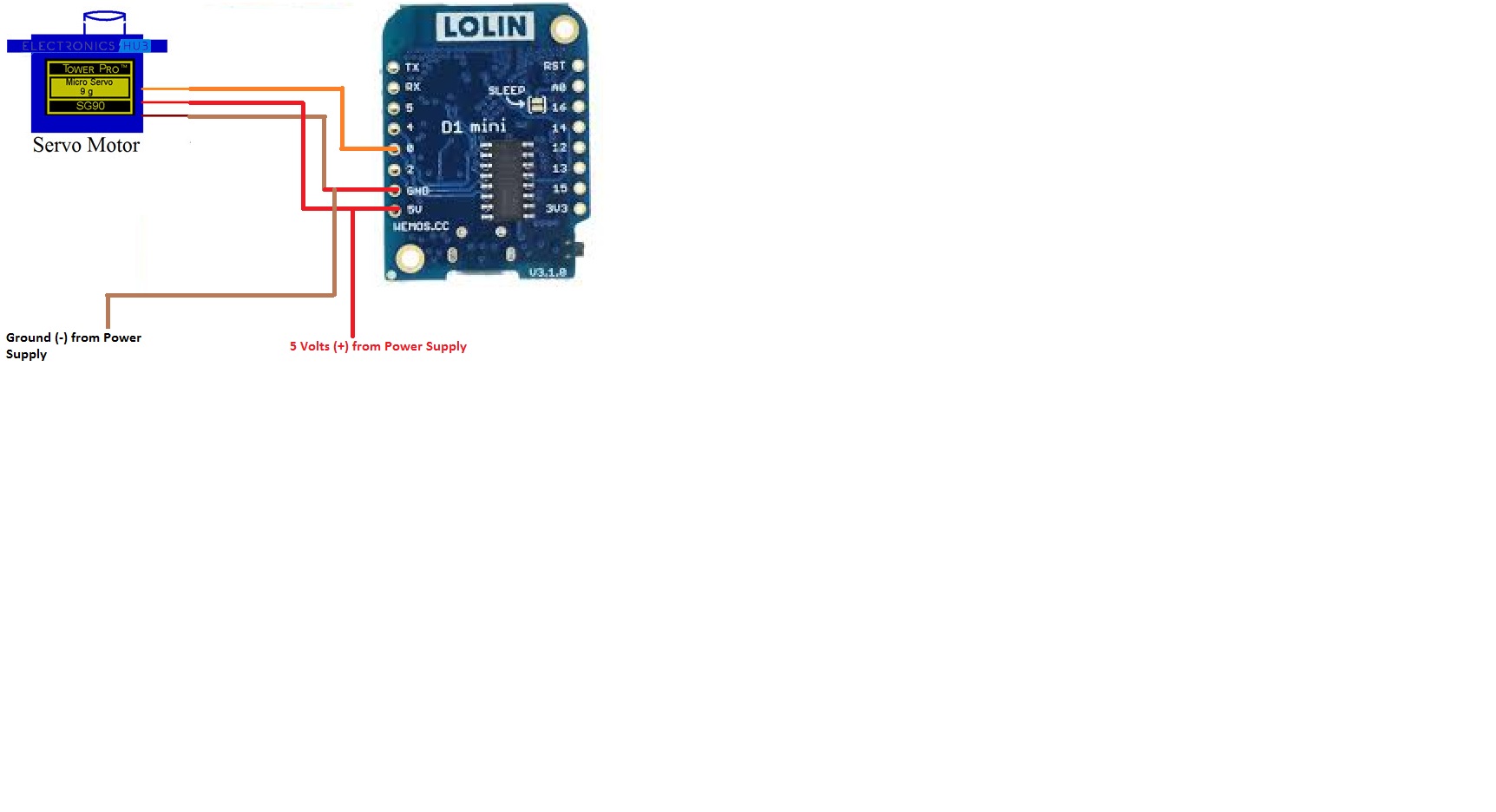
Does someone have a wiring diagram they could share? I just burned out a D1 Mini, I had my 996R connected to 5v, G and D3. Connected to network, opened web server and then D1 started smoking and went offline before I could unplug usb. It’s toast. I’m wondering if my servo is pulling too much power? Interested to see how you guys have these wired. Thanks in advance.
Wemos D1
5 Volt Pin to 5 volt supply from power supply and to Red Wire of Servo
Ground Pin to Ground of Power Supply and to Brown Wire of Servo
Pin 3 to Orange Wire of 996 R Servo
The only thing I did differently was power the D1 via the USB connection (5V from laptop so I could monitor via Serial Monitor). Not sure what went wrong, it was all connected to a breadboard and I’ve used the D1 previously with no issues. I have 3 more that came in today, I’ll give it another go. Thanks for the reply!
Measure your output from whatever power source you are using and make sure that it is a constant 5 volts. I use a laptop power supply that provides 19 volts DC . Soldered in a buck converter to regulate the voltage at 5 volts DC. Used a multimeter to adjust the voltage to exactly 5 volts on the output. I bet you had a wire or multiple wires on the breadboard setup that became mashed and then a short was present. I would put my multimeter probes on the 5 volt input and ground of the corresponding pins of the Wemo D1 and make sure that its reading 5 volts.
This project does not do curtains. It does servos to control the pitch of blinds.
You didn’t have the 5v for the servo being powered off the 5v pin from the D1 did you? DON’T do that. The regulator on the D1 will never be able to handle the pull from the servo and you’re going to burn out the regulator. Make sure that the servo has separate 5v power.
Ryan,
I have 5 volts from a buck converter connected to the 5 volt line of the servo (Red Wire) and also connected to the 5 volt pin of the Wemos D1 . Works perfect for weeks now. Next thing I am considering is changing to the ST_Anything and DTH that you posted. I want the blinds to be able to be set to certain increments like Open 50 percent and have Alexa able to process that. I also want the blinds to close tighter when all the way closed. When I close them all the way now the Servo does close them tight , but then tension is released by the servo and they open back up a bit. Here is video. https://www.dropbox.com/s/dsb4fm2ufx4b66s/20191024_144224.mp4?dl=0
Yeah, I don’t think that changing to ST anything is going to help you. The only way to keep the blinds up is going to be to keep voltage applied to the servo. That is going to burn the servo out pretty quick and also, most likely, create a noticeable hum from the servo too. I would recommend that you look to see if your blinds are rubbing against the frame of the window at the top. I had this problem. I solved it by putting a furring strip in between the blinds bracket and the wall. It brought the blinds a 1/2" away from the wall and allowed them to clear much easier and travel much smoother. Good luck!
No rubbing on window. I just checked. Thanks for the suggestion! The rod and manual geared device that I removed has a bit of resistance built into it so that when one closes up the blinds manually and tightly they stay in that position as the geared mechanism has enough resistance to overcome the natural tendency to open slightly. I have tried to cinch them up tight with the servo in both directions. Slats pointed all the way up and slats pointed all the way down and they open back up slightly in both directions.