Not sure if this has been asked between the two feeds on Core… i understand this is still in alpha and at any point may require a complete reinstall that could effect the created pistons.
Will an anouncment be made when the app is at a point where future revision will NOT effect past pistons?
Ive created a few pistons and they seem to be working very well but dont want to go too crazy if things are still up in the air with the over all core platform.
Sorry if this has already been covered. Its not an easy forum to search.
Thanks
Paul
I don’t really think changes will be made to the extent where all pistons would have to be rebuilt. But changes where all the pistons need to be revisited, yes. Last one was when I removed the “Enabled” option from the piston UI so that I can control it from the dashboard, which provides a much faster way to enable/disable several pistons at a time. On a different note, no one seems to have noticed the Paused pistons count under CoRE’s Runtime Statistics is always 0. Hard coded to 0, really
Time for another stupid question from me.
When I define a new piston, under ‘Application Info’ and ‘Name’ I give the piston its own unique that means something to me.
Underneath name there is also a field called ‘Description’. I do not use this as the ‘Name’ field tells me everything I need to know.
Is there a reason/use for the ‘Description’ field?
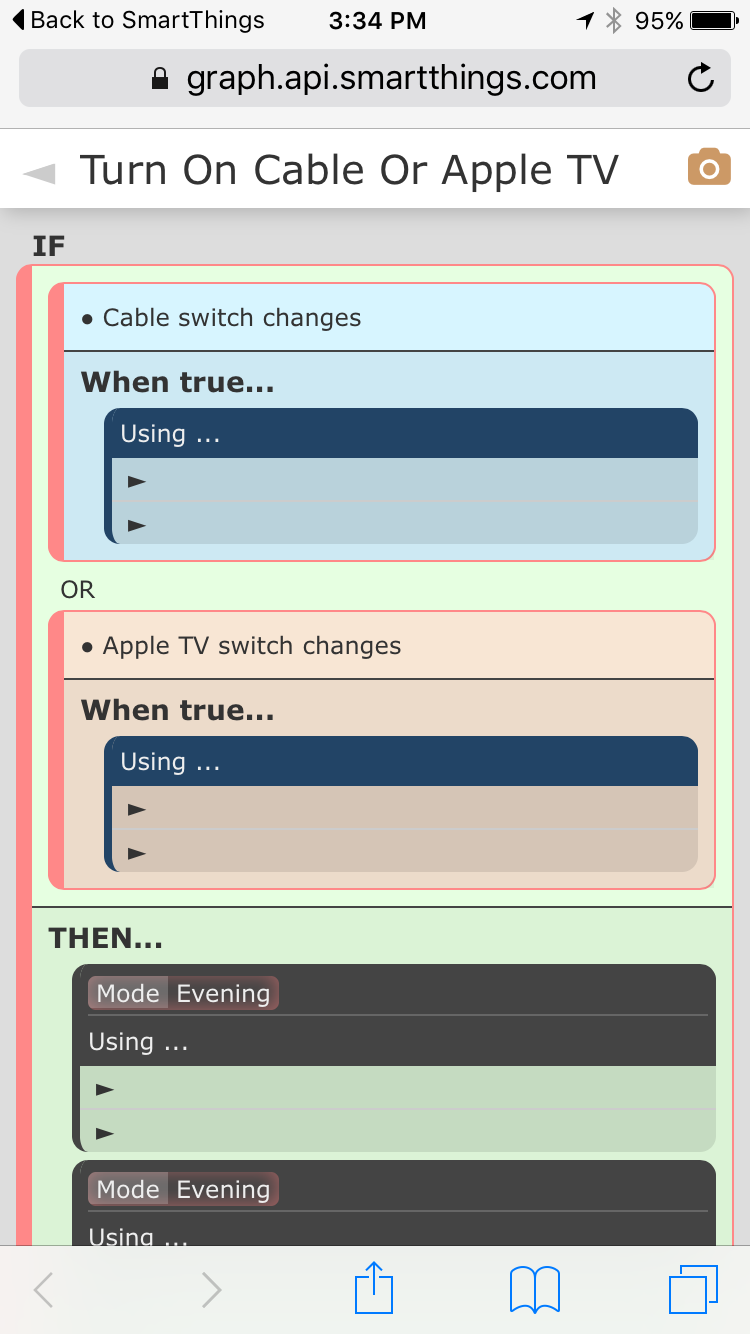
I tried to take a snapshot but nothing happens when I tap the camera icon. I’m using iOS Safari browser. Also, the details of the ‘Using’ steps don’t appear in my dashboard, see below:
[quote=“ady624, post:121, topic:48189”]Has anyone noticed you can take a snapshot of the piston in the dashboard? It opens an image in a new tab, you can then save that to your Photos and post it here No more multiple screen snapshots…
[/quote]I actually did take a photo snapshot of this piston, but decided my logic was so convoluted that I’d better communicate it by reducing it to its basic logic.
[quote=“ady624, post:121, topic:48189”]
Else-If piston: IF (conditions) THEN (actions) ELSE IF (conditions) ELSE (actions)[/quote]
Yes, I did look at the ELSE-IF, but concluded it just had the opposite nature, i.e. I could put subisdiary conditions after the ELSE but could not put them after the main IF. I could well be misunderstanding the scope of the clauses. Let me try with your example, slightly re-worded to differentiate clauses:
If my main condition is condition1, then I can have actions on that, but not conditions so I can’t have further state evaluations at that level.
I am able do the condition2 evaluation after the ELSE IF. So, it looks to me like using the ELSE-IF, as compared to a THEN-IF, moves my complex capability to the ELSE side, but still doesn’t give me the ability to have two complex evaluations.
I hope this makes sense, because I’m not sure I understand what I’m writing. Thanks for your patience.
So we agree you have two different conditional sets. Are they linked in any way, or are they completely independent? Let me explain:
Else-If will only look at conditions2 if the overall result of conditions1 is false. Then-If does the opposite, it only looks at conditions2 if the overall result of conditions1 is true. The final ELSE statement is executed if the Else-If conditions2 is false, or if either of the Then-If conditions1 or conditions2 is false. Does this help? Or maybe it’s easier if you explain in words what you’re trying to do?
If presence1 and presence2 are present
  if day set mode to Home Day
  if night set mode to Home Night
if any presence 1 or presence2 are not present (iow, **ELSE**)
  if presence1 is present set mode to P1
  if presence2 is present set mode to P2
  if presence1 and presence2 are not present set mode to Away
Five different clauses would work, but my old (as in 40 years ago) programming instincts tell me I don’t want to re-evaluate the primary condition every time.
Okay, here’s the BIG news. v0.0.061.20160602 - Alpha test version - Minor bug fixes. Introducing the Follow-Up piston. Chain them together, delay them forever, do whatever you need with them
Follow-Up pistons are just like the Simple pistons. The only differences are:
does not support triggers
does not subscribe to anything
They can be initiated from other pistons via the Follow up with piston task. This task can be delayed just like any other using the Wait task in front of it, so you can technically say "IF (this) Then (that) Else (wait 5 min, follow up with piston).
Even better, you can follow up with the piston over and over… the follow up piston can follow up with another piston, even itself. Combine that with a global variable counter and you can have a complex solution where something initiates the counter, does things and follows up with a piston that can follow up with itself x times until either your expectations are met, or the counter hits 0, hence giving up… I guess, unlimited possibilities Enjoy.
UPDATE: Got sidetracked, this post should be in a different place… not on this thread, sorry.
Oh, okay. Well, next question. A couple posts ago there was a mention of an update, do I need to do anything to update to the latest code or is that pushed out to the users?
So I have the following two pistons, the first being for arriving at the house during the daytime and the second being for arriving at the house during the nighttime. But today when I arrived at the house well before nighttime both pistons fired. Can someone help me understand why?
Now I would understand why both pistons would fire if I arrived at the house at exactly 10 minutes before sunset or exactly 10 minutes after sunrise. But that wasn’t the case today and is very unlikely to ever happen. Thanks in advance for any assistance.
So, looking for a little help. I have 2 lamp modules and a ge smart switch. This is what I have so far but can’t figure out how to write the piston to only turn off the module that it turned on…
If light1 is on and lightswitch changes to on, then turn on light2. Or if light2 is on and lightswitch changes to on, then turn on light1, else toggle light1 and light2
This works fine, except that it turns off both lights when lightswitch turns off, regardless of whether or not one of the modules was already on