[Edge] Matter Playground

A few additional tips for using brightening and dimming

Configurable 0% to 100% time is set using setting

image

image

Possible selections for Dimming action

All these brightening and dimming functions are using configurable 0% to 100% time


@mocelet You can correct if my tips are not correct.

Thanks for the screenshots @TapioX , you saved me some work :grin: . That’s indeed how smooth dimming goes.

Full dimming time in settings

That’s how long it takes from maximum brightness to minimum. By default is 5 seconds which is a good value. I personally use 4 seconds which mimics the native remotes of my lights. Lower is hard to achieve accurate control.

Automation with smart buttons

Provided the button supports Held and Release events:

  • Button 1 Held: Dimming: Start brightening

  • Button 1 Release: Dimming: Stop

  • Button 2 Held: Dimming: Start dimming

  • Button 2 Release: Dimming: Stop

Note the Release event is not a standard feature in SmartThings so it depends on custom drivers. For RODRET for instance you have to enable in settings the Release as Toggled Up and use that. In others it’s Held Up.

Start variants

They control if the light will turn on when increasing the brightness or will turn off at the end when decreasing and reaching the minimum.

It can be great that it turns on when you increase the brightness, so may make sense to use the Start brightening + On. But I hate that the light turns off if I go too low, I prefer to stay in the minimum, so I pick Start dimming and not the “+ Off” variant. It all depends on if you have independent button actions for on / off / toggle or not.

Or maybe you have multiple lights, but sometimes you only use one or two, not all. With the regular variants, only the lights that are on will visibly change the brightness since the others will remain off.

Internally it translates to using the native Matter Move command or MoveWithOnOff that couples the on/off state to the brightness. It’s also the third argument of the stepLevel command, by default the steps will not turn on or off the light because it uses Step but you can pick StepWithOnOff too by setting the argument to true.

New update. Version 2025-11-03T16:35

A year ago I wrote a post about how to use Matter transitions in stock drivers using the Rules API and the setLevel command. Also requested to add the transition time argument to color or temperature setting commands but the request didn’t go too far.

I’ve made custom versions of colorControl and colorTemperature adding the transition time so now you have full control over gradual transitions in Matter, both via relative step commands and absolute set commands. Perfect for your own local and smooth wake-up or wind-down routines or even colour animations for TV time.

The new commands, named after the stock ones, are:

  • setColorTemperature(temperature, rate)
  • setColor(hue, saturation, rate)
  • setHue(hue, rate)
  • setSaturation(saturation, rate)

:warning: Watch out for lights that flood the hub during transitions, you can check that in the history. At least Nanoleaf and WiZ (1.35.0) behave more or less, I’ve not tested other brands.

:information_source: As a reminder, the rate argument, like in setLevel, is the transition time in tenths of a second, the maximum in Matter is 65534 which is 109 minutes.

If you submit that as a pull request, I’ll buy you a beer - and throw in a randomly selected device from my stash, probably a certain motion sensor.

Haha, you know that will go nowhere since it’s a custom capability and they don’t accept PRs. Production capabilities seem to be written in stone, I actually think if they add a new argument some integration will break and that’s why they don’t want to touch them.

If someone uses these in Rules API, they should use these capabilities

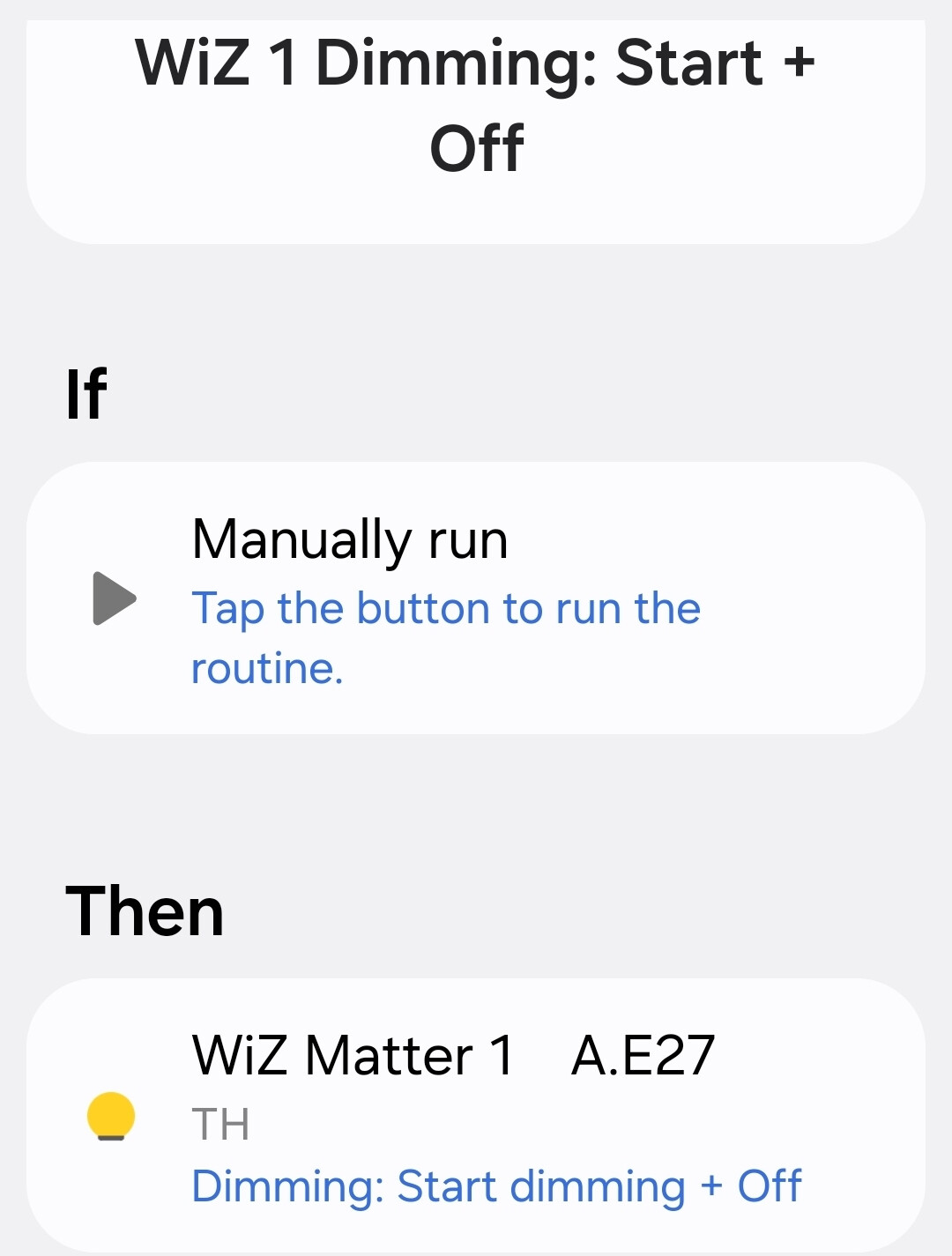
Using this driver makes routines really simple

The Wiz bulb performs all functions after the start command given by the hub.


I wanted to share these couple of examples. The effectiveness of the functions can be understood better from the examples than from the text.

I’m glad you’re finding it useful! :grin:

Coincidentally I tried the On with timed off command yesterday with a Nanoleaf Essentials and instead of turning off they crashed and had to power cycle them :sweat_smile: . I’m not getting more, that’s for sure.

Indeed! It’s appreciated and I’m also curious about how people are using the features.

@mocelet, thanks for the shoutout.

I performed tests with multiple LIFX Matter color lights (13x26 Ceiling light, two “LCM3” Matter-capable LIFX Z strips), paired with a Philips Hue Dimmer Switch connected directly to SmartThings via Zigbee, and a Zooz ZEN37 Scene Controller connected directly to SmartThings via Z-Wave.

Smooth dimming can be achieved, more-or-less, with held down / held [up] events.

I tried the “Start brightening + On”, “Start dimming + Off”, and “Dimming: Stop” actions in routines connected to the smart buttons’ held down and held up events. I left “Full dimming time” to the default 5 seconds. This works, but the hub gets flooded with dimming level messages (in this case, for up to 3 lights) every 1% and the “Dimming: Stop” action appears not to be fired for quite some time, usually not until it’s too late and the LIFX lights are fully on or off.

Matter Playground “Step dimmer level” action (+7, -7) in combination with two Scene Switcher virtual devices work as expected, with a slight lag. I set up the smart buttons’ held down/held up to “Auto Cycle [>]” and “Auto-cycle [STOP]”. When doing stepwise dimming, it works as one would expect: the Scene Switcher fires the Scene 1 event (allegedly) every 500ms, then the Step dimmer levels are adjusted +/- 7%, then the lights fire dimmer level change events. This sequence appears not to overwhelm the hub. However, it does take a perceptible lag between a button press and the first step dim to be visible on the lights, and it also appears that one extra 7% might sneak through after letting go of the button.

I have several follow-up questions:

Is a Matter light flooding the Matter controller (hub) with 1% dim notifications expected behavior, unexpected behavior, or not defined by the Matter spec? Getting 1% changes really shouldn’t be a big deal for an efficiently implemented modern software stack. Also if smooth dimming, a user might really want to do something fun when a light smoothly crosses, say, the 50% threshold to play some nice mood music, or turn on under-stairway lights at 10% brightness in a home theater, or something. The problem appears to be that the SmartThings Hub must be doing all sorts of things every time it gets and processes a device notification, which bogs it down.

Can @mocelet implement the Matter Playground driver to intercept and silently drop 1% dimmer changes, when the driver knows that “Start brightening” and “Start dimming” are active? Perhaps silently dropping these events will help the SmartThings Hub not get overwhelmed.

Relatedly, can the Matter Playground driver expose “Dimming started”, “Brightening started”, and “Dimming/Brightening stopped” events/device statuses, so that can be used as a trigger for other routines at the beginning/end of the dimming, in lieu of many 1% dimmer notifications?

Would it be any smoother or more responsive to implement the Scene Switcher periodic firing of step dimming levels, into the Matter Playground device itself? As pointed out, the button → Scene Switcher → Matter Playground Step dimmer level set of routines works, but there is a little lag. I wonder if button → Matter Playground “Start Periodic Step Dimming” parameter: +/- X%, parameter: Y ms, and button → Matter Playground “Stop Periodic Step Dimming” will achieve more timely behavior.

In a SmartThings routine action, can a driver allow a user to specify multiple parameters, or only one parameter?

Is there any way to expose step level dimming in SmartThings Lighting Groups? I set up a SmartThings Lighting Group with the three Matter Playground LIFX lights, and no driver-specific features (step level dimming, for example) appear to be exposed in the routines. I was hoping that the lights would synchronize a little better.

That’s expected, most lights flood the hub and it becomes sluggish so the automation to send the stop takes forever and arrives late. Nanoleaf does the same, it’s fine for long transitions but not for a fast smooth dim.

Matter 1.4 specification makes not flooding the hub mandatory and limits it to one report per second. Tell LIFX to update their bulbs or at least fix the flooding :slight_smile:

Okay, so according to Matter 1.4 it’s the device’s responsibility…

What happens if the driver silently drops the messages so they don’t become SmartThings hub events for processing, per my post above?

When doing Matter negotiation and discovery, is there a way to observe the device’s Matter version compliance level? Is that a reported thing?

Support request submitted!

I was realizing I didn’t see the second post with questions. Let’s see:

  • The flood depends on the device, I’ve been telling WiZ forever to fix it and they finally fixed in 1.35.0. Nanoleaf knows it but didn’t do anything about that and it’s been a year. Bridged IKEA lights don’t flood the hub for what’s worth.
  • The driver doesn’t even get the brightness level reports, that’s handled by the hub firmware now to be more efficient. The only solution is getting bulbs that are known to be good citizens or annoy vendors to fix it.
  • It’s not possible to know the intermediate state while dimming since that depends on the reports of the bulb and the tendency to avoid flooding is not reporting too much while transitioning. Some bulbs just send a couple intermediate reports and the final one when they reach the target or it’s stopped.
  • Adding the Virtual Scene Switcher logic to the driver would be pointless. My first Matter custom driver that I never published, a year ago back when absolutely no bulb had correct Matter compliance, followed that path and tried to emulate the features. It’s not worth it and the effect will never be the same, the path is a stateless driver that uses the native features of Matter and lights that correctly do things.
  • SmartThings routines in the app only allow one parameter, that’s why for some features you need the Rules API for now.
  • SmartThings groups are managed by SmartThings. Last year I requested to include relative brightness (steps) in both stock drivers and groups but so far nothing has happened.

I believe that’s all! Let me know if I missed something.

@mocelet okay.

Is there a way, perhaps, to more precisely time the lag between the button action and the action of the bulb?

I have tried numerous dimming solutions over the last 4 months to dim LIFX lights, and the only one that genuinely seems to work is the LIFX Switch + LIFX Light, where when you hold down on a LIFX Switch button, you choose the action “Increase Brightness” and “Decrease Brightness” in the LIFX app. Ironically, this is a cloud action and when I disconnect Internet connectivity it ceases to function, but it really does work responsively despite the cloud round-trip.

The LIFX HTTP API specifies a State Delta:

I can’t find any documentation for the LIFX LAN Protocol that would achieve exactly the same thing (delta state). I guess the Matter protocol does implement the delta, but not quite the way we want because of the flooding issue and the lag-time issue.

What I am thinking, though, is on start dimming, one could use the LAN protocol to get state, then use the LAN protocol to set state at 100% brightness or 0% brightness with a specific transition time (for example: 5 seconds maximum, divided by the current brightness level and the direction of brightness desired). Then on stop dimming, the driver would get state and issue a set state message to be the same as where the light currently is, likely stopping the transition from proceeding.

Back to the Matter issue. With LIFX, I guess we are at a pause until LIFX stops flooding SmartThings, or unless we figure out a way to reduce the lag time between button press and the actual dimming action.

Matter, just like Zigbee, has both the delta (step) and the continuous move up / down + stop (start / stop). This driver uses the native Matter features to do that.

The problem is LIFX implementation of Matter, probably because it’s old and Matter specification wasn’t so clear about what to do during transitions. If they fix it the feature will work perfectly, just as it works now in WiZ lights but didn’t until recently. To be fair, most vendors had that issue, some have updated the Matter code, others haven’t.

The lag is because of the flooding, the hub is busy, also talked about that a year ago. I don’t know about the new Aeotec hub but the V3 is not precisely powerful.

Home Assistant configures the intervals so they report once per second but that introduces other issues so the best solution to use smooth dimming is getting lights where it works fine, which right now there are not many. I’ve not tested the most recent ones like the Aqara or the new Hue. And the IKEA to be released in 2026 will for sure not flood anything since their Zigbee lights don’t.

Can I get a more detailed explanation for the Matter driver settings?

When do these parameters matter and when do they take effect? (I kind of can guess but I want to make sure, while doing testing.)

In prior posts I had the default values which were 5s and 0s, respectively. However sometime today I will observe the LIFX behavior with non default values.

Are fractional seconds actually supported and implemented by the driver? Does the underlying matter protocol operate on integer units of milliseconds?

Full dimming time affects the Dimming: Start actions. Native Move command in Matter for smooth dimming requires a speed, i.e. how many brightness units per second. The driver calculates the speed so it takes you that time to go from 100% to 0% or viceversa.

Step level transition affects the Step dimmer level action. When it is 0 there is no transition to avoid flooding, that’s why it’s 0 by default but the step may not be smooth. If you add the transition the step is smooth and will last the time specified but you know the story about bulbs that send too many changes.

Of course. If you can write a fractional it is supported, otherwise the field would be integer only. Matter time unit is tenths of a second.

Thought I would share a real use case of the On Level attribute in this custom driver and how I used it initially to fix a bug in WiZ 1.35.0 lights.

WiZ lights have an amazing feature called rhythms in their app, you can set the state of the light at different times of the day so for instance the hallway lights turn on at full brightness during the day and dim at night, regardless of how you turn them on (voice assistants, remotes, apps, automations, etc.). It saves you lots of routines and was one of my favourite features!

Unfortunately, firmware 1.35.0 broke the rhythms when using Matter and the brightness was wrong. The issue was they were setting the OnLevel attribute to the wrong value and that controls precisely the brightness level used to turn on the light in Matter.

I disabled the rhythms in WiZ app and built the behaviour the native Matter way with a SmartThings daily routine which is a perfect fit. All you need is Write On Level at different times of the day so it has effect until the next time it changes.

Now, whenever you turn on the light during the day it has full brightness and if you turn it on at night is dim. You can use sunrise and sunset too in the daily routines which is a plus.

The manually run routines are for testing and convenience, you can Write On Level directly in the daily routine so it’s all done in a single routine, so convenient!

Mind OnLevel value is not converted by the driver and it’s in Matter units (like in Home Assistant), not percentage. For 100% you have to write 254, for 50% 127, for 10% 25, for 1% 1.

If you don’t want to force a specific brightness value so it turns on with the last brightness write -1 which is the default and maps to null in Matter (in Home Assistant they use 255 for that but I find -1 more intuitive for the previous brightness). You can change the value directly from the details screen.

Support of On Level across lights is not stellar though, Nanoleaf rewrites what the user sets when the light turns off so you need to work around that and WiZ rewrites it after a power cycle. I hope they both fix the bugs! (Update: The driver now includes a feature to enforce the On Level value set through the app or automations, it’s quite useful while the bugs are fixed by the vendors!)

Remember that post about creating native smooth brightness transitions in SmartThings and how a JSON Rule was needed for a simple gradual fade to 10%?

Life would be so much easier if you could just grab the phone and create a new routine in the app.

I would use the native transitions a lot more, wouldn’t you? :slight_smile:

If only it supported gradual temperature changes I could even create my own wind-down routine to dim the light at night while making the light warmer. Something like level 20 temp 2100 minutes 30

See, I always wanted a buttery smooth wake-up routine from 1% 2100 K to 100% 6500 K. I could set the initial state with normal routine actions but we know doing it right is tricky. Wouldn’t it be awesome if I didn’t need to care about those subtleties? Describing that effortlessly with a smartphone keyboard will require some thinking, maybe level 1-100 temp 2100-6500 minutes 30

I would definitely wake up to that. But isn’t that too much to type? I’m lazy…

Perfect :grinning_face: I’ll write it down to copy-paste it later L 1-100 T 2100-6500 M 30

Look Ma, no Rules. Available from driver Version 2025-11-08 :smiling_face_with_sunglasses:

Wait! Is it too much to ask for gradual colour changes too? Maybe a change to red like hue 0 sat 100 seconds 10? :grimacing: I’ll make sure to check that my lights don’t flood the hub and the history of events :see_no_evil_monkey: