Thanks I’ll give this a shot!
I am trying to sync a number of RGB lights (Hue and LIFX) to whatever RGB Bulb 3 is set to but I just can’t get it to work. I managed to do so only when setting one device as another physical device but not by using attributes. What am I missing? I researched this quite a bit but I could not find a solution.

This is the log of when I turn RGB Bulb 3 on, and the other lights should be set to match it but all values seem to be at zero however the other lights, which are currently on and set to RED, do not change at all.
8/14/2017, 9:30:43 PM +442ms
+1ms ╔Received event [Dog House].time = 1502764244548 with a delay of -1107ms
+277ms ║RunTime Analysis CS > 22ms > PS > 107ms > PE > 148ms > CE
+292ms ║Runtime (37702 bytes) successfully initialized in 107ms (v0.2.0e5.20170812) (290ms)
+294ms ║╔Execution stage started
+323ms ║║Cancelling statement #13’s schedules…
+364ms ║║Restoring attribute ‘hue’ to value ‘0.0’ using command setHue(0.0)
+416ms ║║Executed physical command [Fireplace Mood Light].setHue([0.0]) (51ms)
+418ms ║║Executed virtual command [Fireplace Mood Light].loadStateLocally (83ms)
+440ms ║║Restoring attribute ‘hue’ to value ‘0.0’ using command setHue(0.0)
+1354ms ║║Executed physical command [Living Room LIFX Bulb 1].setHue([0.0]) (914ms)
+1355ms ║║Executed virtual command [Living Room LIFX Bulb 1].loadStateLocally (934ms)
+1377ms ║║Restoring attribute ‘hue’ to value ‘0.0’ using command setHue(0.0)
+2269ms ║║Executed physical command [Living Room LIFX Bulb 2].setHue([0.0]) (892ms)
+2271ms ║║Executed virtual command [Living Room LIFX Bulb 2].loadStateLocally (912ms)
+2292ms ║║Restoring attribute ‘hue’ to value ‘0.0’ using command setHue(0.0)
+2412ms ║║Executed physical command [Living Room Mood Light 1].setHue([0.0]) (119ms)
+2414ms ║║Executed virtual command [Living Room Mood Light 1].loadStateLocally (140ms)
+2435ms ║║Restoring attribute ‘hue’ to value ‘0.0’ using command setHue(0.0)
+2498ms ║║Executed physical command [Living Room Mood Light 2].setHue([0.0]) (61ms)
+2499ms ║║Executed virtual command [Living Room Mood Light 2].loadStateLocally (83ms)
+2503ms ║╚Execution stage complete. (2210ms)
+2600ms ╚Event processed successfully (2600ms)
interesting use of capture/restore. try changing the variable from dynamic to device and see if that helps.
if that does not work why not directly set the attributes like so?
with RGB Bulb 1, ..., RGB Bulb 6
   set color to RGB Bulb 3's color
   ...
end withHey guys!
Thanks for the hard work. I am working on transitioning some pistons from CORE to Webcore and I am stomped.
I am trying to recreate somethng along the below piston. It would evaluate all the IFs independently and follow through with the action.
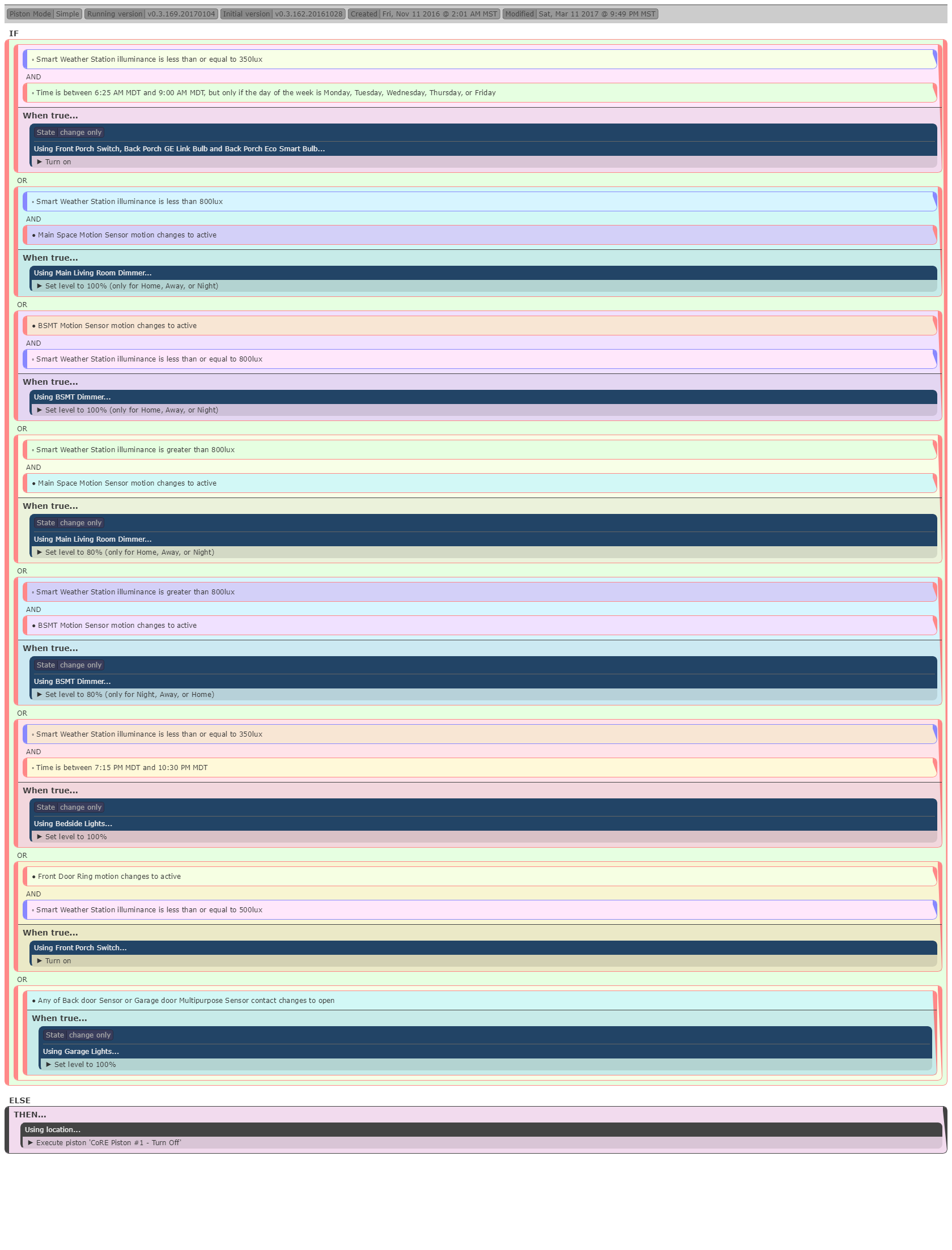
I came up with this in webcore, but it doesn’t work. First the wait to shut off the lights for the main motion sensor and bsmt motion sensor are coupled (I want it to be independent for each). The lights that are supposed to come on at a certain time are not.

Anyone have any tips?
I’ve used presence sensors, Life360 and phone over months and months. For me, Life360 and the presence sensors work best. I was having issues with the pretense sensors initially, they would leaving and coming back arbitrarily, but that seems to have resolved (prob over a year ago now). The phone was always an issue for some reason. Whenever I want to run a piston that involves coming or going, I include ANY for coming home (since it’s pretty hard for a sensor to accidentally come home) and ALL for leaving…which eliminates just one of the two sensors leaving and changing the piston state. This combination and backup plan serves me very well and I rely on it pretty heavily. You mileage may vary…
1 Like
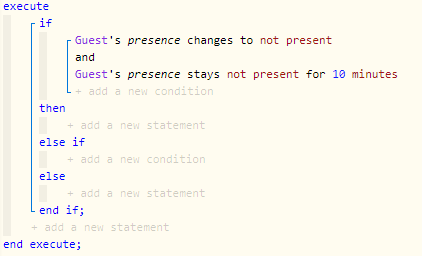
@firefox15, Do you mean like this?
I have asus routers at home and at work… how would I go about doing this?
I’ll give that a shot, thanks!
I’d follow bangali’s advice above (this one). Additionally, I have a similar setup for my outdoor lights, but I use random times to turn them on and off within a range. For example, line 24 in your code posted above would read: Wait randomly between 60 minutes and 180 minutes; then line 25 will shut them off. I do this as poor man’s security. Anyone casing the joint wouldn’t know whether I’m home or not. Do I believe anyone is or ever will case my house? No. Is it a cool feature and fun to implement? Yes.
It seems you could eliminate the first “Guest presence changes to not present”. It looks like it could cause problems since something can’t change yet stay the same for 10 minutes. Sorry I can’t test it right now.
Just to add to the conversation, I use Sharptools + Tasker on my phone for presence.
I had a couple of different problems. One was unreliable presence using my phone. The other was that my phone as presence would stop functioning as a device. So repeatedly, I had to pull my phone out of all my rules, pistons, smartapps, etc., remove it, re-add it, then build it back into everything - very tedious to have to do several times.
I added a simulated presence sensor through the IDE and built that into all my rules. So, that fixed one problem, I didn’t have to rebuild stuff anymore.
I can use webCoRE to to trigger the simulated presence using whatever criteria I want. One way is standard presence … now if my phone stops working again, I only have to rebuild that one rule rather than 20 odd pistons, smartapps, action tiles, etc.
Nice thing with a simulated presence is that I can just tap it in the app too, if everything fails, to set me as home/away.
But I used Tasker + Sharptools to flip a presence switch. I use various combinations of virtual switches for different things. Tasker can detect bluetooth and wifi connections. So I use wifi near (rather than connected since connection takes more time it seems to me) in Tasker with my home network to flip a switch in ST through Sharptools. Switch on = I’m home, switch off = I’m not. I also use bluetooth for various connections, such as when I’m connected to my bicycle computer, lots of creative uses for these features I’m just starting to get into.
I don’t know if the simulated presence can be manipulated directly using Sharptools… I didn’t try it, I already had the presence switch for other things, so I kept using it.
I’m not great at describing, sometimes. But basically, Tasker sees me connect to home wifi, tasker uses sharptools to flip my home switch, webCoRE sets my simulated presence as home when the switch is on.
THis way you can use network connection regardless of router brand.
This whole ramble is only applicable for Android … I didn’t check to see if that’s applicable to the conversation.
2 Likes
That’s true. Not sure how that would work. I could eliminate the first condition, but then that action would likely run whenever any other subscriptions had a state change, and I would only want it to run one time. I’ll try out the code you have and report back, but I’m guessing you are correct in that needs to be coded in another way.
I suppose I could simply check it once then check it again ten minutes later, but that seems like a hacky way of doing it, plus then it only checks it once at the end.
Hi, I have some light switches and the $Status isn’t returning what I thought it would. I am checking for:
Dining Room Lights $Status is ‘ON’
In the Logging I see : Comparison (string) ONLINE is (string) ON = false (3ms)
It’s returning ONLINE instead of ON.
How would I be able to tell if the light switch state is ON or OFF?
I am using Eaton RF9540-NAW ASPIRE Single-Pole Multi-Location Master Dimmer Light Switch

What about this? Or something similar using seconds to make sure it is captured?

Yes, SharpTools can directly control the arrived() and departed() commands of a Simulated Presence Device:

Here’s some documentation on taking an approach similar to yours with WiFi Near:
And a SmartThings community member put together a really nice profile using GeoFences with AutoLocation which provides high precision presence detection with low battery consumption:
This can help you reliably trigger presence based events in webCoRE. 
2 Likes

Thanks. I’ll give that one a shot. Can you tell me how to enter the “followed within” command. I can’t seem to figure that out.
This is brilliant. I’m going to do this now before I create too many pistons.
I’ll give Sharptools a look. Thank you.
1 Like
Click on the “and” and change the logical operator. To edit the “followed by” part, edit the second expression.
Fantastic, thank you. I’ll give that a shot!