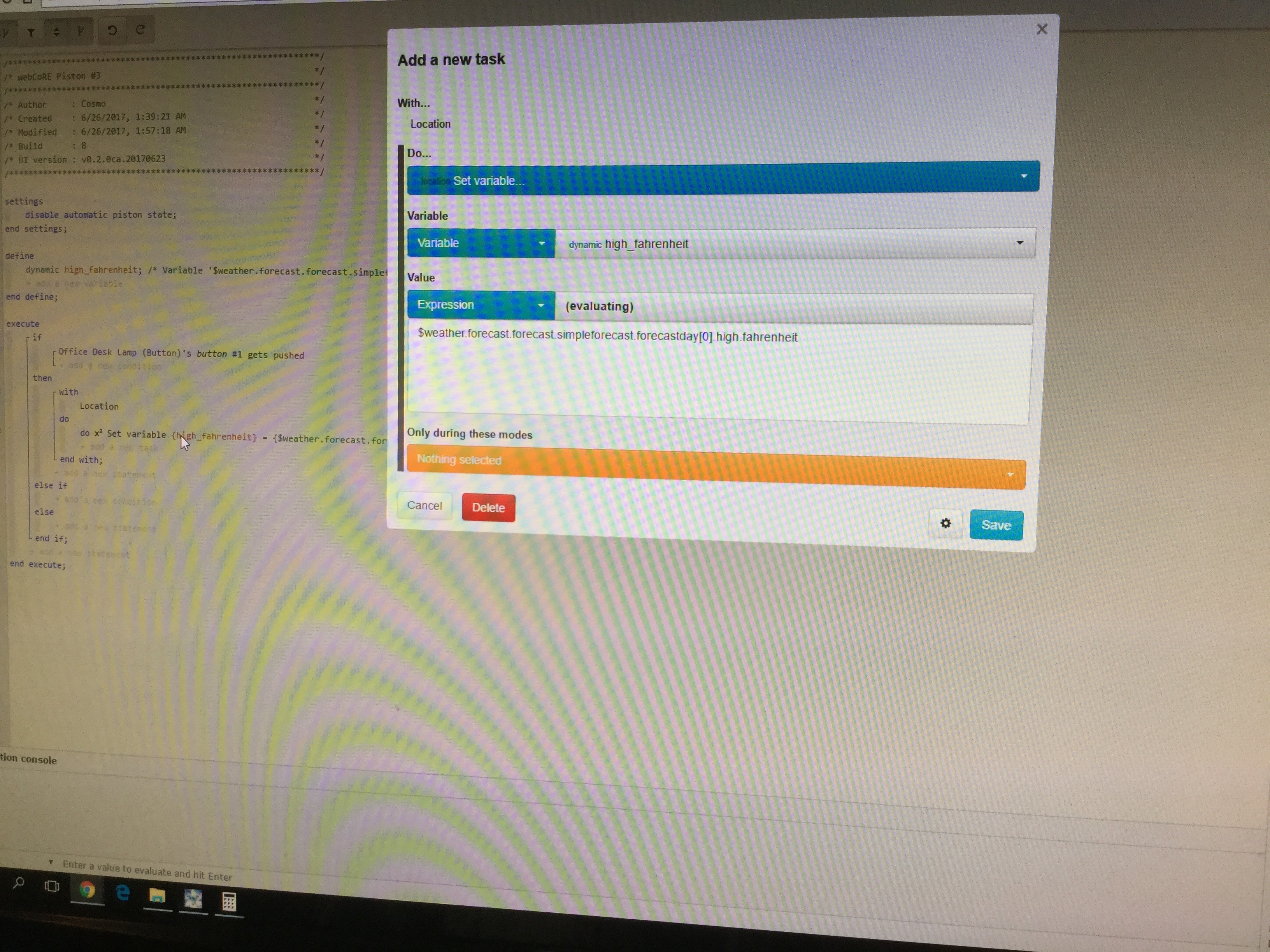
Basically the way i want it to work it is not working.
I want it to re-increment the counter each time i walk in the room. I have been in the room when the light goes off and it should not go off, if ive been moving around in the room i would like it to restart the counter. How can I keep that from happening?
@c1arkbar and the OP - I’ve had good results with the approach @bobbles uses - instead of the WAIT I like to use STAYS INACTIVE on motion for then turning off lights etc. Bobbles - what does the Set Piston Stage do here?
@Nezmo this one is interesting. just to confirm if motion stays active, the light (switch 6) stays on continuously and does not turn off then on again?
When you disable Piston State you can then input what you want to be shown in the dashboard.
It gives a quick view of how things are with your pistons at hat particular time.
@ady624@mbustillos1
Ok, so I’m officially confused. I tried saving the expression as a variable’s value (for test purposes upon a button press).
It’s not working.
An I supposed to modify the strings you have?
Please pardon my ametuerishness, but I’m trying to understand how to do this. I know how to define and assign values to variables.
All I did was x2 set variable “my_forecast_variable” to (expression)
{$weather.forecast.forecast.simpleforecast.forecastday[0].high.fahrenheit}
This then displays this whole string and says not gound in the (green) variable definitions output
What am I botching here.
Btw, this is just a test piston. I will assign this later as a global variable on an hourly update. This is just to understand how to build this variable assignment
Does anyone use Nest Thermostat, and have anything triggering on Operating State Changes to?
I’ve consistently had problems with this and am wondering if I am choosing the wrong option. For example, i want this one to trigger when the AC kicks in. When that happens I can see on my Nest that the display changes to Cooling. So I assumed this was an operating state change. But perhaps I’m wrong.
This piston doesn’t fire for me. Thanks for any feedback.
Yes, the light (switch 6) stays on until motion has stopped for ten minutes. I use these a lot. Each time new motion is detected the wait counter restarts otherwise the counter counts down to zero and only then does the light turn off.
Quick question. I guess I need to make Task Cancellation as NEVER to make sure my light turns off after a 2 minute wait (it stays on if I don’t). My question is, do I only need it in the WITH statement, or do I also have to put it in the initial IF?
so I got my lights coming on at sunset piston working again, but I’m finding that when lights are turned off previously, the previous level (typically 80-100%) is retained. How do I effectively set up the conditon/statement so that the lights are starting from 0% when fading?
Do I need to set the level to 0% prior to initiating the fade command?
Hi, thanks so much for the quick response. I definitely want changes to. Basically, the cooling set point is at whatever temp, but yesterday the AC kicked on (house had reached cooling setpoint) but all the windows were still open. (So it changed to Cooling) Don’t want to cool the whole neighborhood. So I wanted a piston to basically make an adjustment if the AC kicks on but the windows are still open.
So in theory what I have should work…but doesn’t. Hmmm…not sure what to do about that.
And sorry, wasn’t sure what you meant by these two comments…
Edit: Oh…did you mean that it(Nest) could send notifications outside of WebCore? I only put that in my piston so that I would know that it ran and reset the cooling setpoint to 23. Changing the setpoint was the true point of the piston. Just wanted the head’s up as well so that I could close the windows and then adjust the setpoint back down to let the AC kick back in.
@bigverm23 - disable command optimization will fix this for you (when in the piston, click the piston name, select the cog, Command optimizations - Disable). Command optimization will remember the old setting (80 to 100% level) and try to reuse that setting if you have an ‘On’ line
Just to clarify…I thought Thermostat Mode was the base mode that the unit is in like Heat (will only activate furnace heat when required, no AC), Heat/Cool (will activate heating or cooling as needed to maintain setpoints), and Cool (will only activate AC to maintain setpoints, no furnace Heat).
So right now my Nest is set to Cool Thermostat Mode, and will remain in that until about mid September. And so its in Cool Mode, But changes Operating State to ‘Cooling’ when the cooling setpoint is reached and the AC engages.
Or do I have those terms mixed up in the way WebCore sees them??
Don’t know if you still have CoRE installed but I have (2) EcoBee3 and I could only get ThermostatOperatingState to work sometimes. I was using it with wait timers or stays and it would either not change at all or was very inconsistent.
I ended up going back to CoRE for this rule and it never fails. I have a rather large house and trying to keep it cool under 78 degrees = $$$$$$.