It is the DLNA speaker “Tiny Dancer” which is an android app. This is with the MediaRenderer (Connect) smartapp - which is the only way I know how to do TTS is with that app and a DLNA device.
I use playText with my Sonos. Scares the **** out of my wife. WAF crash.
2 Likes
LOL! Too funny. When the RM for mail arriving ran last week I got a text from the wife that it scared the **** out of her. It wasn’t loud, just in a quiet house then “The Mail is here” from the Amazon Echo.
I’m surprised I wasn’t told to turn that off! WAF survival!
Thanks for your help, using the Speak and its working fine. This is some advanced stuff here! My co-workers who already know I’m a geek had to admit this was a pretty cool example with feeding the dogs!
3 Likes
OK So I just got started with CoRE but stuck in my first Try
I’m trying to do a simple piston on my Lock (Schlage Connect) so when someone unlocks I can take an action depending on who unlocked the door (everyone on my household has their own code)
I have a piston that triggers on: If front lock changes then …
But what I need to know is that the lock was (un-locked) so do I have to look at a local like $currentEventValue to know if it was locked or unlocked?, would I test this as part of condition?
Also, is there anyway to know which code un-locked the door? is it store in another local variable?
Help will be greatly appreciated.
BTW.
No Documentation or Wiki yet right?
1 Like
The locked/unlocked is part of the condition. When you build it, you pick a comparison (is, changes to, etc) and then a value (locked/unlocked). There is no code support yet.
1 Like
@JcMarin … yet is the key word here!!!
1 Like
Hello all,
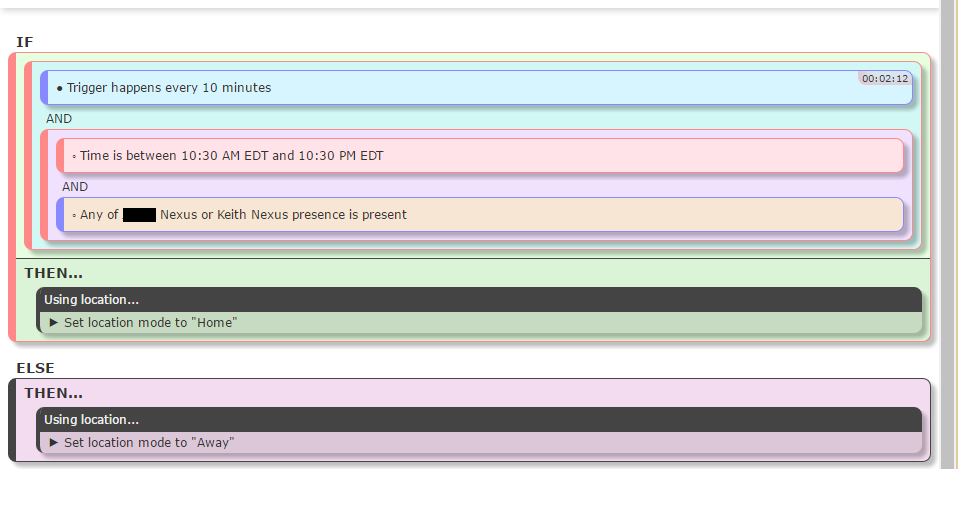
So I’m trying to make a Mode watchdog piston. I feel that too often my presence coming and going is not triggering the Routines that set my house’s mode which is causing my lights to stay or AC to be set low costing $$$. Here’s a screenshot of my Piston that I tried to create, I probably just messed up my OOP if someone could take a look that’d be sweet.
I wish I could drag logic around the IF THEN ELSE levels in the Web UI. I hate being trapped in a phone to setup complex automation.
Thanks!
I’m trying to set up a piston to do the following but I cannot seem to find the necessary conditions etc. to do it.
Mode Changes from away to home then if in the next 10 minutes there is motion in the hall, speak some text.
I’ve had a good rummage around the various piston types to no avail.
Any guidance/suggestions much appreciated.
Hey Keith, ST is all about events. Why poll?  Try this latching piston:
IF
  Any of XXXXXX Nexus or Keith Nexus presence changes to present >>> when true >>> Send PUSH Notification "{$currentEventValue} has arrived home :)"
  AND
  Time is between 10:30am and 10:30pm (this makes sure mode is set to Home only during these hours)
  AND
  Location mode is not "Home"
THEN
  Using location...
     Set location mode to "Home"
     Send PUSH Notification "Switching house to mode Home"

BUT IF
  Each of XXXXXX Nexus or Keith Nexus presence is not present
  AND
  Location mode is not "Away"
THEN
  Using location...
     Set location mode to "Away"
     Send PUSH Notification "Switching house to mode Away"
How does that work?
1 Like
I’ll give it a shot. Thanks for the response. Can’t wait for that import functionality. 
Keep fighting the good fight. Together we can make SmartThings more than useless!
2 Likes
what i am trying to do is turn a light on a random color at sunset by fading it from “0%” to 30%.
So setting hue and saturation won’t help me correct? It’s a lightify rgb flex strip.
Thanks!
@bamarayne said I should first set the level to zero.

Set color always sets the level as well. So you’re asking the device a lot of things. Let me think.
I still can’t get my capture/restore of a bulb to work with my Phillips hue color bulbs.
Let me start by saying that CoRE is absolutely awesome. It’s the coolest thing I saw on ST platform since I got my hub a month ago. Its extremely powerful, reasonably easy to use, and very reliable even being an early alpha.
My question: what’s the best approach to have a time-driven rule? Something like “At 3 PM every day, check if outside temperature is above 90 and if yes, turn on a switch for 1 hr”.
Thanks!
2 Likes
I assume the above cannot be done.
Would a Then-If piston work
If mode changes to home
Then do nothing
Then if motion sensor changes in next 10 minutes
Then do message
IF
   Time trigger happens at 3pm, every day
   AND
   Outside Sensor temperature is greather than 90
THEN
   Using Switch
      > Turn on
      > Wait 1 hour
> Turn offThanks, but I can’t find the Time trigger. Is it “Date/time” capability, “happens at” comparison?
1 Like
Yep that’s the one