Can you explain what you want to achieve with this piston?
Hi All,
I’ve got a very basic piston which turns on my lights for 30 seconds when movment is detected:

Is there a way for the piston to check for movement again before turning off? (between step 3 and 4 on “THEN…” section)
Some sort of “re-evaluate the entire piston” before jumping to last step? I’m basically stood in the dark after 30 seconds, even though the motion detector is still in “motion”
Sorry if this has been answered; threads a bit long to read.
Kraeg

Using an accelerometer as a trigger it increments a variable from 25% to 60% in 5% steps which is also used to set a dimmer to the same level. When acceleration stops it turns the dimmer off and then decrements the variable in steps of 5% until it reaches 25%, that is unless acceleration starts again, and if it does, it activates the dimmer and sets it’s level to the current value of the variable.
I am not looking for other ideas of how to write the piston but rather trying to understand java the error being generated from the LOOP WHILE statement and whether the syntax is written correctly or not.
Is there a way for me to implement a Then statement that would cover an activity for home?
What I would like it to handle it is to count within 15 minutes activities. If there is less than … 20 occurrences then I don’t want it to be true and change the mode to home. But if more 20 within 15 minutes then change to true and change mode to true.
Hey, Im trying to setup one piston for 6 presence sensors.
When these sensors leave / arrive I get a notification.
This is allready setup like this:
If presence “devicename” is present notify me.
Problem is I have I have 5 presence sensors setup, but the notifications isnt device specific.
So Im wondering If theres anything I can add in a custom msg to have it notify me off specific devicenames.
Take a look at this… it should do the trick for you.
http://thingsthataresmart.wiki/index.php?title=CoREsamples#Family_Presence_Notifications
@bobbles that works better - but still not perfect. Still get a disco effect when movement isnt detected for all of a few seconds.
Anyone know if its possible for the “wait for false state” to be changed to "wait for false state for * seconds* before moving on to next phase?
E.g. dont turn lights off unless there hasnt been movement for 30 seconds
Kraeg
I’m a bit of a fiddler and have changed some of my pistons.
This is working for me.
You might want to try something like this.
The timer resets when there is motion and the light is still on.

Thank you, looks like what I need.
But I cant figure out the the “switch” and “case” things, where and how do I add that? Sorry for stupid questions, but I cant seem to figure it out, been messing with this for hours now.
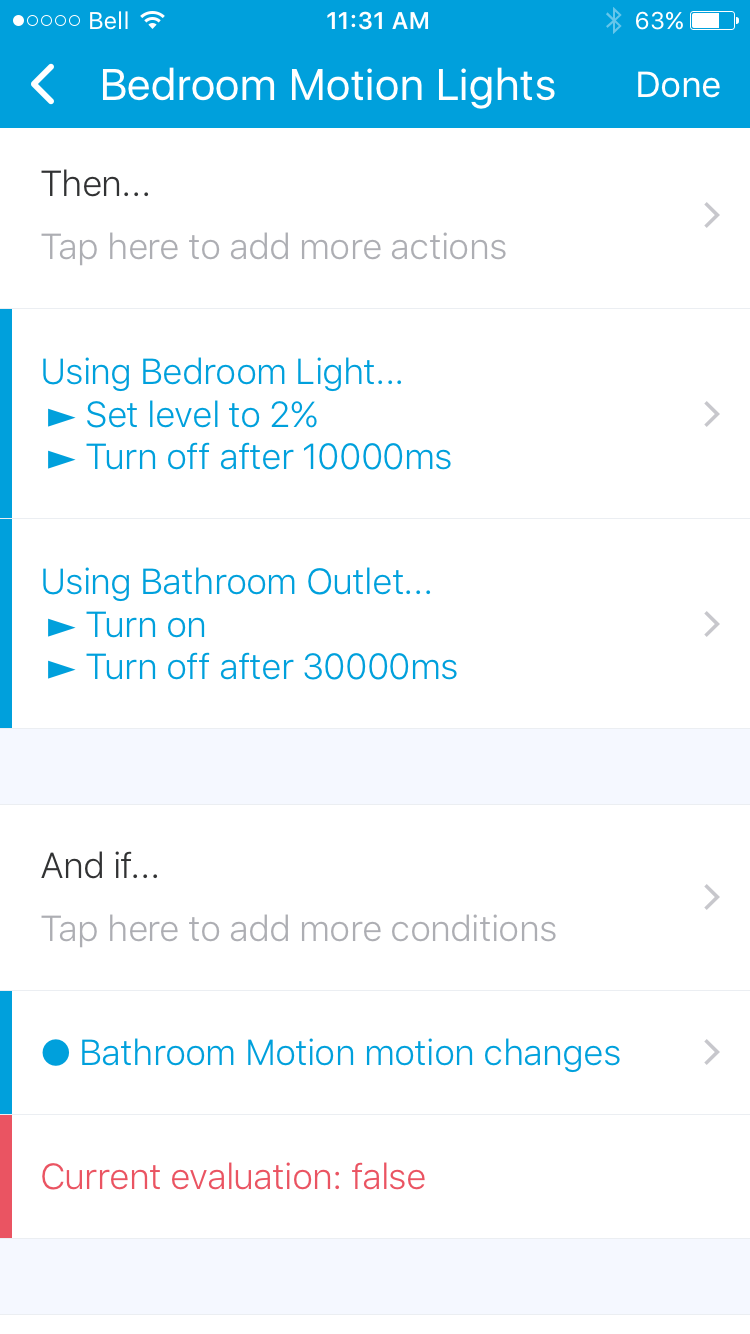
Hoping someone can shed some light. I’m trying to create a bedroom bathroom lighting rule where.
If motion in bedroom = active
THEN turn on bedroom light then turn off after 10sec, turn on bathroom light and turn off after 30 sec
AND-IF motion in bathroom = active
THEN using bathroom light, cancel pending local tasks, wait 10min then shut off
Problem is that the 30second shut off from the first if-then always trumps and shuts off the light in bathroom.
This may work for you @GadgetWiz
Piston 1 (Basic)
IF motion in bedroom = active
THEN Turn on bedroom light,
Turn off bedroom light in 10000 milliseconds,
Wait 30 seconds,
Execute Piston 2
Piston 2 (Follow Up)
IF motion in bathroom = active
THEN Wait 10 minutes, Turn off bathroom light
ELSE Turn off bathroom light
How about posting a screenshot of your piston so that the peeps on here can see exactly how your piston has been set up.


How do you add the “Wait for false state”? I can’t seem to find that setting.
Click on dashboard then the piston you want to expand.

Thank you!
Difference is, my CoRE Dashboard says “Tap Here to initialize the CoRE dashboard” I tap it, it does nothing.
Have you Oauth’d the Smartapp?