Don’t use a smart switch to control current to a smart bulb. Any kind of smart bulb, including LED strips.
If you read the user guides for these, you’ll see that they all say that these bulbs are intended to always be on power and the bulb will decide for itself how much current to draw.
There are two reasons for this.
First, if you cut all current to the smart bulbs, they won’t be able to hear the next “on” command from the network and you will restrict the automations you can do with them.
Second, when you first flip the switch on there is an"inrush" of current. It’s OK if this happens once or twice a year when you have an unexpected power outage. But if you are using a switch to frequently cut current to the lights and turn them back on you can over time damage the radio inside the smart bulbs and significantly shorten the life of the already expensive smart bulbs.
If you want to get smart light strips, and you want to have a switch that controls them, then use either a battery operated switch or a switch on a different part of the circuit. See the following FAQ for discussion of those set ups:
Or use a smart controller like the Fibaro RGBW controller and just use regular dumb LED strips. That’s often the most cost-effective solution.
Yea, I’ve read not to use a switch on smart bulbs. I will think about what I want to do with this. I’d hope I’d remember to just keep the switch on and use google home or my smart phone to turn the lights on and off.
For the garage door, lifemaster doesn’t integrate, does it. So what addition do I need to automate and geofence my garage doors? Aeotec z-wave door controller maybe?
Sorry, but I’m not remembering I have a few clarifications I need help with.
And our house, we use a child lock on the existing switches to remind people not to use them. And then our main means of light control is the Amazon echo, which everybody likes.
I just did a full get renovation and two things I didn’t do that I wish I had:
If you’re going to have a motion/multi sensor up on the wall and it takes a power source, run a mini USB from a closet or where you can plug it in concealed. Much more constant polling.
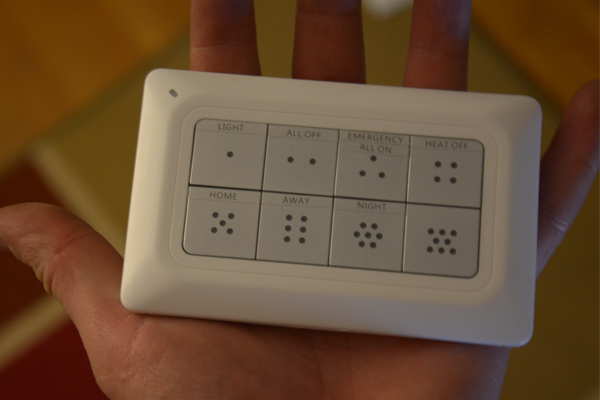
If you’re going to have smart outlets control floor lamps consider having a spot in the gang box for a WT00Z-1 (https://www.amazon.com/gp/product/B00EAY3K5Y/ref=oh_aui_search_detailpage?ie=UTF8&psc=1) or equivalent because even though I use my phone my wife and guests don’t. So when they turn off the lamp it doesn’t matter that you control the outlet. I’ve ended up with Iris buttons next to my switches which work but look like crap.


 !
!