Well I had an old Uno laying around and it was just a few bucks to buy the transistors and resistors. I also had fun doing this and let’s face it guys - we are here because it is fun – otherwise we would just pay some dude to do it for us. Anyway you are right - if I had to do it all over again I would just buy a Mega clone. It isn’t clear to me how the ATMEL will help one discern between 6 and 12 volts. This is what I needed as opposed to a current protection, although I needed both.
@ogiewon
Dan, thanks for the information. I ran some tests and wanted to follow up with my findings for awareness. I created a sketch using only the Smartthings library and it appears that there is a 78 character limit that can be transmitted from the Arduino to SmartThings.


I am working on updating my alarm integration and was hoping to use a JSON object to easily parse out the various pieces and I noticed that some of updates were not making it to SmartThings, hence my original question to you. I wanted you and everyone to be aware of this limit.
Ken,
Sorry, I didn’t see you needed to discern between 6 and 12 volts. I thought you were just piggybacking off your existing 12v alarm system that used standard contact switches.
For future reference, the UNO also uses an ATMEL microcontroller with the same I/O diode protection configuration. The Arduinos that I have seen, whether original or clones, all use ATMEL microcontrollers.
Thanks for sharing. This is some very useful information to know. I wonder if you’re hitting a ThingShield limitation, or an Arduino software limitation. By default, an Arduino has a 64byte serial buffer size. You might want to try increasing the buffer size. See the following article for details of how to do this for the Hardware Serial ports.
@ogiewon thanks again for making this library. I’m getting around to trying to implement it but none of the contact sensors are showing up correctly within the SmartThings UI. I purchased a SainSmart Mega 2560 clone off eBay as you had suggested.
I’ve created a Gist with all 3 of my files for the .ino, smartapp.groovy and device.groovy files.
Let me know if there is something that is incorrect because I can’t get a single device to show as “closed” within the UI. All contact sensors show as “open” Thanks!
That looks and sounds awesome! I am anxious to try it out.
I just loaded up all of your code, along with my Virtual Contact Sensor Device Handler (x6) and tested everything. It appears to be working perfectly. The Virtual Contact Sensors will update only when the doors/windows update. Opening and closing each of them one time will get everything in synch.
Using the Serial Monitor window in the Arduino IDE, you’ll be able to see some helpful debug messages.
Question for you - how do you have things wired up? For my testing, I am simply connecting a jumper wire from ground on the Arduino, to each of the 6 pins you defined in your sketch, one at a time. This simulates the wiring I use in my house to sense open/closed at each doors magnetic reed switch. Wiring is simply Arduino Ground --> Reed Switch Terminal 1 / Reed Switch Terminal 2 to Arduino Digital Input Pin.
If you were sending 5V, then the pins would never see a change of state. Because we’re using the Internal Pullup resistor feature of the Arduino, the Digital Input Pins already have 5V on them when nothing is connected.
All,
I have just finished adding in support for the Dallas Semiconductor DS18B20 OneWire Temperature Sensor to the ST_Aything library per a user’s request. Hopefully others will find this useful as well.
You’ll need to grab three new libraries and a new example sketch from my GitHub Repository at https://github.com/DanielOgorchock/ST_Anything/tree/master/Arduino.
The three new libraries are:
- DallasTemperature (copy to your libraries folder)
- OneWire (copy to your libraries folder)
- ST_Anything_DS18B20_Temperature (copy to your libraries folder)
The new sketch is:
- ST_Anything_DS18B20_Temperature.ino (copy to your sketches folder)
Please read the comments near the top of PS__DS18B20_Temperature.h or PS_DS18B20_Temperature.cpp for descriptions of what each parameter is used for in the constructor in your setup() routine of the sketch.
By default this new library will report out in Fahrenheit, but you can simply change the “false” to “true” if you’d prefer Celsius. Also, I chose 10bit resolution for the DS18B20 temperature calculation. 10bits seem to provide decent resolution while not taking too much time. You can tweak this as well if desired with values of 9, 10, 11, or 12 bits allowed. These changes would be done in the SKETCH’s setup() routine if desired as shown below:
static st::PS_DS18B20_Temperature sensor1(F("temperature"), 120, 0, PIN_DS18B20_Temperature, false, 10);
Dan
@ogiewon thanks for the reply.
I guess, first off, there are some missing directions for the Virtual Contact Sensors/Multiplexer when looking at the GitHub page. I considered the GitHub page the source of truth because the amount of comments on here could be outdated. Once I figure this out I’ll submit a PR. But shouldn’t I see all my contact devices within the Arduino ThingShield Device Handler, without adding in the multiplexer part yet?
The Serial Monitor window doesn’t give me anything useful. I only get three lines of of output. Even if I open and close the contact sensors, nothing is debugged to the screen:
Everything: init started
Everything: Free RAM = 6474
Everything: UNKNOWN
I’m also testing it with this simple setup and i’m not getting any debug output on the serial monitor when i detach and attach the wires.

You’re missing the two jumper wires from pins 14 and 15 to pins 2 and 3 which are used for hardware serial communication. Those details are in the ReadMe on github in the Geeky Material section… Make sure the ThingShield switch is set to 2/3.
The Arduino MEGA should use the new Hardware Serial Constructor since it has 4 UARTs. To use Hardware Serial on “Serial3”:
The “Serial3” port uses pins 14(Tx) and 15(Rx). Wire a jumper Pin14 to Pin2 and another from Pin15 to Pin3.
Use the new Hardware Serial constructor passing in the Arduino’s pin 14/15 UART (i.e “HW_SERIAL3”)
*SmartThings(SmartThingsSerialType_t hwSerialPort, SmartThingsCallout_t callout);
Note: SmartThingsSerialType_t is a new enum declared in SmartThings.h. For the pin 14/15 UART, pass in "HW_SERIAL3"
Make sure the ThingShield’s switch in the “D2/D3” position
Be certain to not use Pins 2 & 3 in your Arduino sketch for I/O since they are electrically connected to the ThingShield. Pin6 is also reserved by the ThingShield. Best to avoid using it.
Without those jumper wires, the sketch will hang waiting for the ThingShield to communicate to your hub.
And yes, your sensors will show up in the Arduino device on your phone without the virtual sensors and multiplexer.
awesome! that did the trick. I’m a complete n00b at Arduino stuff and this is my first go at it so i’m trying to get over the learning curve. When I had the Arduino powered by my laptop USB, the Arduino Serial Monitor window looked as if it triggered the init. I was getting debug output and when I opened or closed a door it would show in the log. However, when I power the Arduino with the wall wart, the movement of doors isn’t registering open/closed. Not sure what needs to happen to make it init() but I’ll do a bit more reading and get there.
I figured out my power issue. I was using a 9V AC wall adapter. I grabbed an old apple USB wall charger and now the devices are working correctly.
Thanks! This is awesome. I plan on doing a write up for spoon feeding noobs. Thanks again!
Glad to hear it is working! It is really satisfying when it does. 
I did this exact thing with my alarm system about a year ago… but I ended up just used a voltage divider. Originally I was using an optoisolater, but it was overkill. I didn’t have an issue with the current draw effecting my panel like you described, though… so I didn’t have to deal with the 180 phase shift of the driver transistor your using. 3 door sensors and 2 wired motion sensors. Honestly, it has been more stable than my z-wave devices in that I haven’t had to touch it in the last 12 months.
I am currently about to code the ST part of my fan control. I took apart a remote and have the Arduino set the dip switches for the selected fan and then pull down the correct buttons. The Arduino part works great, but the ST part is a mess since I have it setup to control 5 separate ceiling fans with 5 buttons each. Another downside is, there isn’t a way to know the current state of the devices… not an issue for the fan part, but the light is a toggle. But honestly it is really only the fan I care about and I can always handle the light state with a separate sensor if I get weird about it.
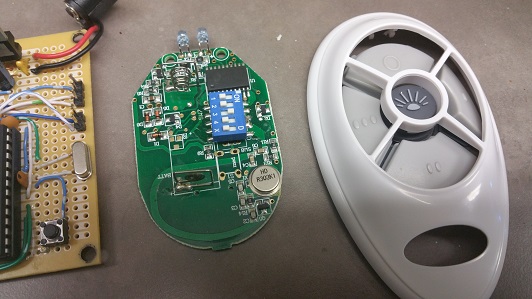
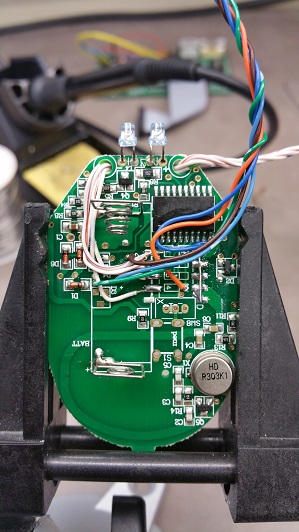
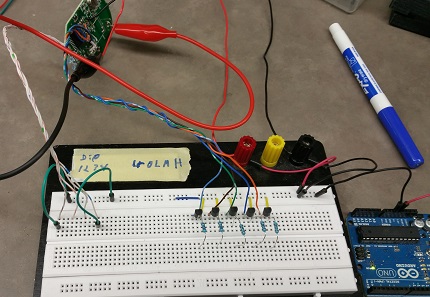
Nice project. Look forward to hearing how it turns out.
@ogiewon Dan,
I’d like to suggest that you document the pin jumpers for the Mega in the constants section of your example code stating that they should be jumpered.
Every time I start a new project, I have to hunt around to find which pins go where.
Thanks.
Todd
@ogiewon, as promised I did a nice spoon-fed write-up. Feel free to link to it within your original post or on the GitHub ReadMe. Hopefully it will cut down on the amount of comments that are asked multiple times on this thread.
Total Noob Guide To Move Your Old Wired Security System to SmartThings
@kacole. Very nice write-up!
Posted this on the deals thread, but I figure it might be better targeted here. Micro Center has Inland (off-brand) Arduino Mega 2560s on sale for $10. Just picked up a couple at the Denver store.
Hi, Not sure best place to post my issue… I am putting together a smartshield project that is pretty basic, 1 magnetic switch (side door), 1 reed switch (garage door), 1 relay (Garage Door), 1 DHT11 (I had one laying around).
Everything works fine except when I press the garage door button it trips the relay and the smartthings app crashes saying it has sent the crash information to the developers. At this point I have to remove the device and re-add to the network, reset the type to a ST_AnyThing. I have tried removing things and its when it trips the relay (with nothing hooked to the relay). Not sure why its crashing the smartthings device / app though?
I am a noob in regards to ST and so I am not finding any detailed logs, perhaps I have to look in the logcat for android? Any guidance would be appreciated. At this point I dont think its with the ardino (Uno) / Shield since everything else works fine. I am sure its something dumb I forgot, I just have not put my finger on it yet.
Thanks,
Jason
/**
 *  ST_AnyThing.groovy
 *
 *  Copyright 2014 Dan G Ogorchock & Daniel J Ogorchock
 *
 *  Licensed under the Apache License, Version 2.0 (the "License"); you may not use this file except
 *  in compliance with the License. You may obtain a copy of the License at:
 *
 *      http://www.apache.org/licenses/LICENSE-2.0
 *
 *  Unless required by applicable law or agreed to in writing, software distributed under the License is distributed
 *  on an "AS IS" BASIS, WITHOUT WARRANTIES OR CONDITIONS OF ANY KIND, either express or implied. See the License
 *  for the specific language governing permissions and limitations under the License.
 *
 *  Change History:
 *
 *    Date        Who            What
 *    ----        ---            ----
 *    2015-01-03  Dan & Daniel   Original Creation
 *
 */

metadata {
	definition (name: "ST_AnyThing", namespace: "ogiewon", author: "Daniel Ogorchock") {
		capability "Configuration"
		capability "Temperature Measurement"
		capability "Relative Humidity Measurement"
		capability "Switch"
		capability "Sensor"
		capability "Contact Sensor"
		capability "Polling"

		//attribute "garageDoor", string

		command "pushGarage"
	}

    simulator {

    }


    // Preferences
	preferences {
    	input "temphumidSampleRate", "number", title: "Temperature/Humidity Sensor Sampling Interval (seconds)", description: "Sampling Interval (seconds)", defaultValue: 30, required: true, displayDuringSetup: true
	}

	// Tile Definitions
	tiles {
		standardTile("garageDoor", "device.garageDoor", width: 1, height: 1, canChangeIcon: true, canChangeBackground: true) {
			state "closed", label: 'Closed', action: "pushGarage", icon: "st.doors.garage.garage-closed", backgroundColor: "#79b821", nextState: "closed"
            state "open", label: 'Open', action: "pushGarage", icon: "st.doors.garage.garage-open", backgroundColor: "#ffa81e", nextState: "open"
            state "opening", label: 'Opening', action: "pushGarage", icon: "st.doors.garage.garage-opening", backgroundColor: "89C2E8", nextState: "opening"
            state "closing", label: 'Closing', action: "pushGarage", icon: "st.doors.garage.garage-closing", backgroundColor: "89C2E8", nextState: "closing"
 		}

 		standardTile("garageSideDoor", "device.garageSideDoor", width: 1, height: 1, canChangeIcon: true, canChangeBackground: true) {
			state("open", label:'${name}', icon:"st.contact.contact.open", backgroundColor:"#ffa81e")
			state("closed", label:'${name}', icon:"st.contact.contact.closed", backgroundColor:"#79b821")
 		}

        valueTile("temperature", "device.temperature", width: 1, height: 1) {
			state("temperature", label:'${currentValue}°',
				backgroundColors:[
					[value: 31, color: "#153591"],
					[value: 44, color: "#1e9cbb"],
					[value: 59, color: "#90d2a7"],
					[value: 74, color: "#44b621"],
					[value: 84, color: "#f1d801"],
					[value: 95, color: "#d04e00"],
					[value: 96, color: "#bc2323"]
				]
			)
		}

        valueTile("humidity", "device.humidity", inactiveLabel: false) {
			state "humidity", label:'${currentValue}% humidity', unit:""
		}

		standardTile("configure", "device.configure", inactiveLabel: false, decoration: "flat") {
			state "configure", label:'', action:"configuration.configure", icon:"st.secondary.configure"
		}

        main(["temperature","humidity"])
        details(["garageDoor","garageSideDoor","temperature","humidity","configure"])
	}
}

// parse events into attributes
def parse(String description) {
	log.debug "Parsing '${description}'"
    def msg = zigbee.parse(description)?.text
    log.debug "Parse got '${msg}'"

    def parts = msg.split(" ")
    def name  = parts.length>0?parts[0].trim():null
    def value = parts.length>1?parts[1].trim():null

    name = value != "ping" ? name : null

    def result = createEvent(name: name, value: value)

    log.debug result

    return result
}

// handle commands
def pushGarage() {
	log.debug "Executing 'pushGarage' = 'garageDoor on'"
    zigbee.smartShield(text: "garageDoor on").format()
}

def poll() {
	//temporarily implement poll() to issue a configure() command to send the polling interval settings to the arduino
	configure()
}


def configure() {
	log.debug "Executing 'configure'"
    //log.debug "illuminance " + illuminanceSampleRate + "|temphumid " + temphumidSampleRate + "|water " + waterSampleRate
    //log.debug "water " + waterSampleRate
    //log.debug "illuminance " + illuminanceSampleRate
	log.debug "temphumid " + temphumidSampleRate
	[
		//zigbee.smartShield(text: "water " + waterSampleRate).format(),
        //"delay 1000",
        //zigbee.smartShield(text: "illuminance " + illuminanceSampleRate).format(),
        //"delay 1000",
        zigbee.smartShield(text: "temphumid " + temphumidSampleRate).format()
    ]
}